Factories > Infrastructure
Deployment patterns for Warp Factories
# Deployment patterns for Warp Factories Choose an execution model for your factory based on where its code must run and who operates the compute. Warp-hosted execution is the default. Managed self-hosting keeps checkout and command execution in your network while Warp coordinates the work. The comparison below also shows unmanaged execution for standalone agents, which is not a factory execution host. <figure style={{ maxWidth: "736px" }}>  <figcaption>Deployment models divide responsibilities between Warp and your infrastructure.</figcaption> </figure> ## Choose an execution model | If your factory needs to... | Choose | | --- | --- | | Run public repositories and services without operating workers | [Warp-hosted execution](#warp-hosted-execution) | | Reach private repositories or services behind your network boundary | [Managed self-hosting](#managed-self-hosting) | | Run standalone agents from CI or developer infrastructure, without a factory | [Unmanaged execution](/platform/unmanaged-execution/) | Both factory options use the same [factory definition](/factories/factory-as-code/), [runners](/factories/runners/), and [factory dashboard](/factories/factory-dashboard/). The execution host changes the location of checkout, command execution, and the sandbox filesystem. ## Warp-hosted execution Use this when your factory can reach its repositories and services over the public internet. The [Automation Platform](/platform/overview/) runs the work on Warp-managed infrastructure while your factory definition selects the agents, runner, workspace, and credentials. <figure style={{ maxWidth: "736px" }}>  <figcaption>Warp operates the control plane and per-run sandboxes.</figcaption> </figure> See the [cloud agent run lifecycle](/platform/architecture/#cloud-agent-run-lifecycle) reference for a description of each component in the architecture. ### What it looks like * **Work intake** - Automations, integrations, Factory MCP, and factory endpoints send work to the factory. * **Execution** - Agents run in Docker-based environments hosted by the Automation Platform. * **Visibility** - Teams monitor work through the factory dashboard, session sharing, and APIs. ### Send work to a factory * Route integration events, schedules, and webhooks to factory agents with [Factory automations](/factories/automations/). * Send work from Slack, Linear, Jira, GitHub, and GitLab through [factory integrations](/factories/connect-your-factory/). * Find a factory and dispatch work by UID from your service using [Factory endpoints](/factories/factory-api/). * Coding agents can hand work to a factory through [Factory MCP](/factories/factory-mcp/). For standalone cloud-agent triggers, see [cloud agents](/platform/). ## Managed self-hosting Use this when a factory must run checkout and execution on your infrastructure while the Automation Platform coordinates the work and records its results. Managed workers support Docker, Kubernetes, Direct, and external command backends. See [managed self-hosting](/factories/self-hosting/) for requirements and setup. For standalone agents that you orchestrate directly from CI, Kubernetes, or developer infrastructure, use [unmanaged execution](/platform/unmanaged-execution/). See [execution security](/platform/execution-security/) for the data and network boundaries shared by both architectures. ## Related pages * [Infrastructure and security](/factories/infrastructure-and-security/) - Choose execution, inference, storage, and credential boundaries for a factory. * [Warp-hosted execution](/factories/warp-hosting/) - Review hosted execution capacity, networking, and supported environments. * [Managed self-hosting](/factories/self-hosting/) - Install and operate a factory worker on your infrastructure. * [Unmanaged execution](/platform/unmanaged-execution/) - Run standalone agents outside a factory.Tell me about this feature: https://docs.warp.dev/factories/deployment-patterns/Choose Warp-hosted or managed self-hosted execution for Warp Factories based on your network, compliance, and operational requirements.
Choose an execution model for your factory based on where its code must run and who operates the compute. Warp-hosted execution is the default. Managed self-hosting keeps checkout and command execution in your network while Warp coordinates the work.
The comparison below also shows unmanaged execution for standalone agents, which is not a factory execution host.
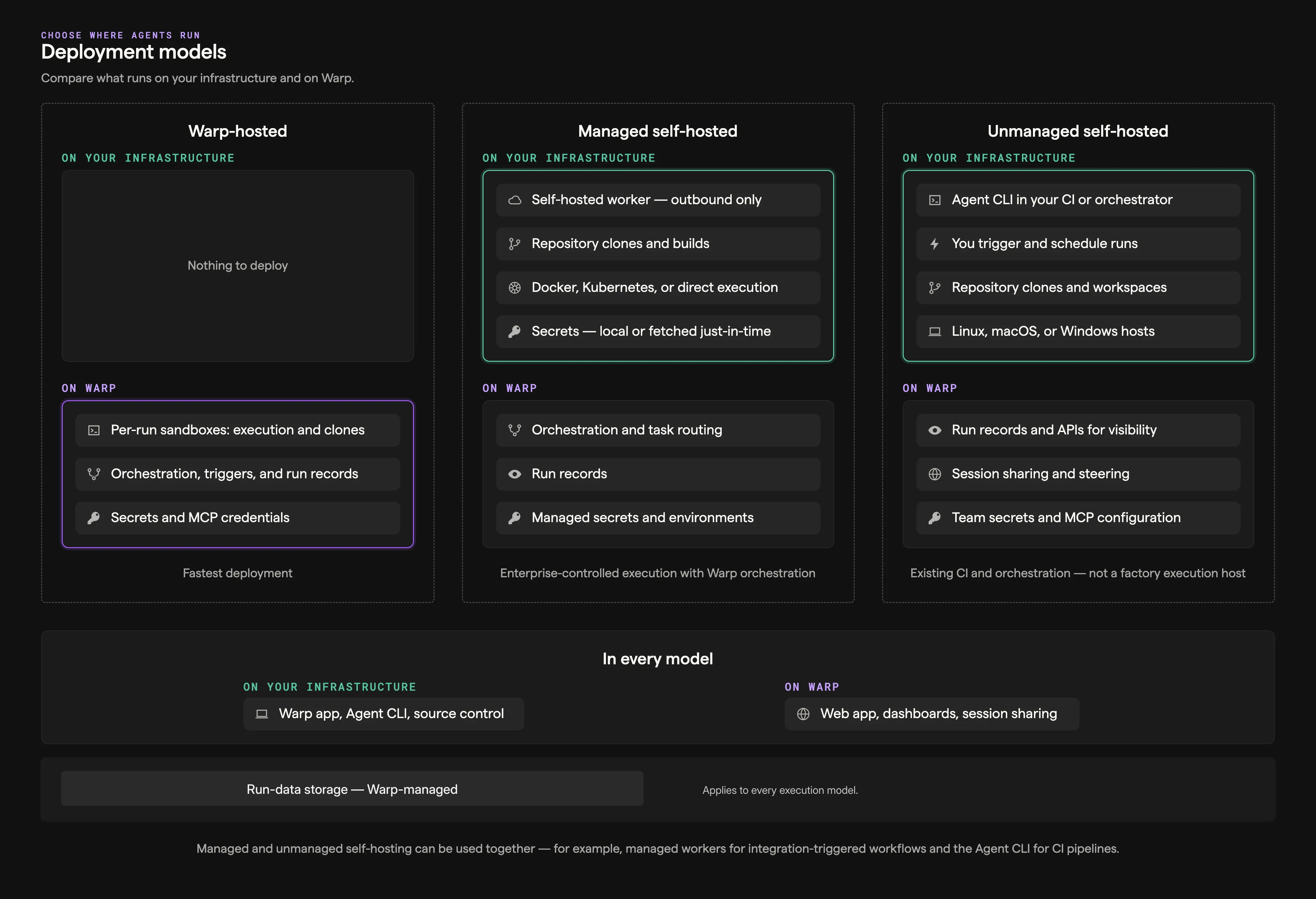
Choose an execution model
Section titled “Choose an execution model”| If your factory needs to… | Choose |
|---|---|
| Run public repositories and services without operating workers | Warp-hosted execution |
| Reach private repositories or services behind your network boundary | Managed self-hosting |
| Run standalone agents from CI or developer infrastructure, without a factory | Unmanaged execution |
Both factory options use the same factory definition, runners, and factory dashboard. The execution host changes the location of checkout, command execution, and the sandbox filesystem.
Warp-hosted execution
Section titled “Warp-hosted execution”Use this when your factory can reach its repositories and services over the public internet. The Automation Platform runs the work on Warp-managed infrastructure while your factory definition selects the agents, runner, workspace, and credentials.
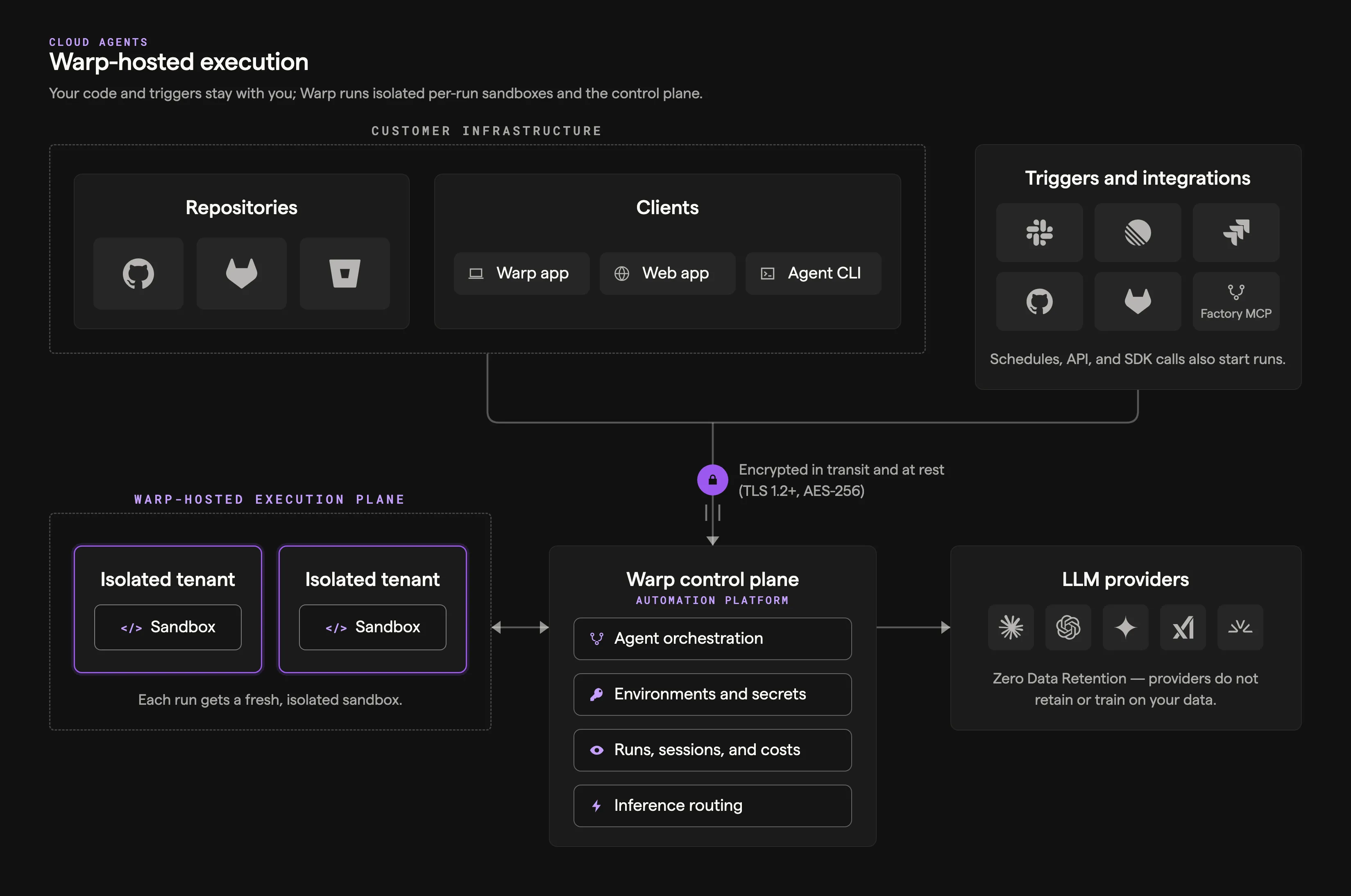
See the cloud agent run lifecycle reference for a description of each component in the architecture.
What it looks like
Section titled “What it looks like”- Work intake - Automations, integrations, Factory MCP, and factory endpoints send work to the factory.
- Execution - Agents run in Docker-based environments hosted by the Automation Platform.
- Visibility - Teams monitor work through the factory dashboard, session sharing, and APIs.
Send work to a factory
Section titled “Send work to a factory”- Route integration events, schedules, and webhooks to factory agents with Factory automations.
- Send work from Slack, Linear, Jira, GitHub, and GitLab through factory integrations.
- Find a factory and dispatch work by UID from your service using Factory endpoints.
- Coding agents can hand work to a factory through Factory MCP.
For standalone cloud-agent triggers, see cloud agents.
Managed self-hosting
Section titled “Managed self-hosting”Use this when a factory must run checkout and execution on your infrastructure while the Automation Platform coordinates the work and records its results. Managed workers support Docker, Kubernetes, Direct, and external command backends. See managed self-hosting for requirements and setup.
For standalone agents that you orchestrate directly from CI, Kubernetes, or developer infrastructure, use unmanaged execution. See execution security for the data and network boundaries shared by both architectures.
Related pages
Section titled “Related pages”- Infrastructure and security - Choose execution, inference, storage, and credential boundaries for a factory.
- Warp-hosted execution - Review hosted execution capacity, networking, and supported environments.
- Managed self-hosting - Install and operate a factory worker on your infrastructure.
- Unmanaged execution - Run standalone agents outside a factory.